In brief
- A fixed reporting calendar matters more than the report itself — drifting periods make every comparison arguable.
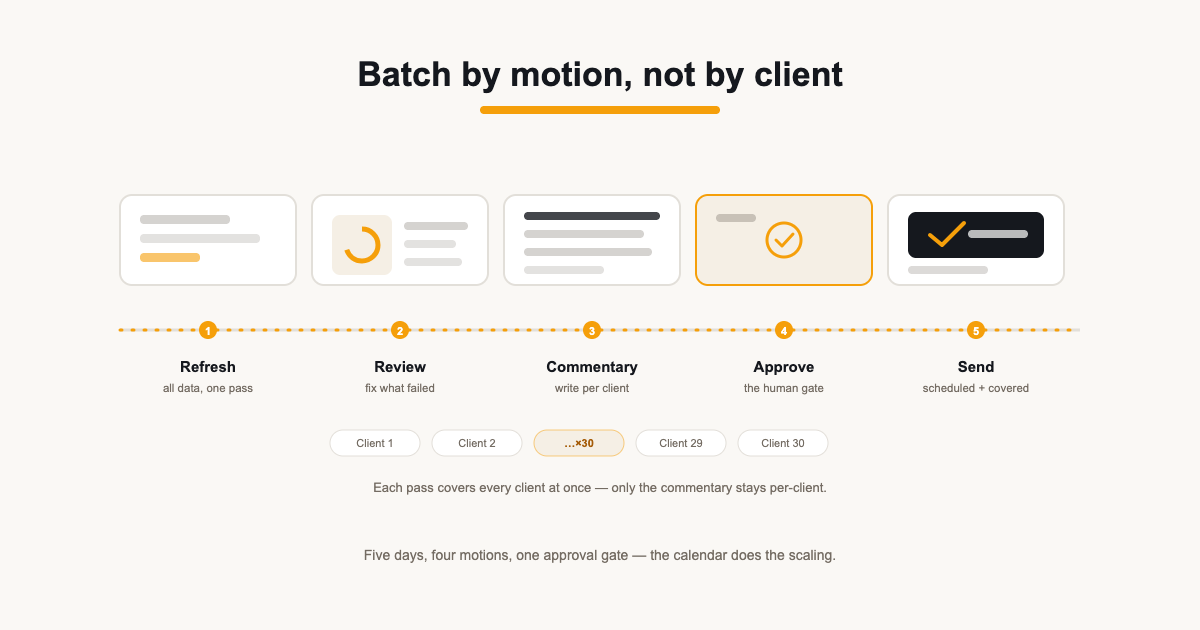
- Batch by motion: refresh everything, then review everything, then write. Never report-start-to-finish per client.
- Keep one human gate before anything reaches a client, and automate everything upstream of it.
Contents
Reporting rarely breaks at five clients. It breaks around fifteen to thirty, when the same task — pull the numbers, check them, write the summary, send — repeats dozens of times inside the same few days and every report quietly becomes bespoke again. The fix is not more effort in the same week. It is a workflow where the mechanical parts happen once per cycle for every client at once, and only the judgement stays per-client.
This is the workflow that holds: a fixed calendar, work batched by motion rather than by client, one explicit approval gate, and a send that feeds the next month instead of starting it from scratch.
Why reporting collapses at scale
With a handful of clients, reporting is a craft task: you open each account, look at the numbers, write a few lines, send. It works because the context switching is small enough to absorb. At thirty clients the same approach means thirty separate sessions of data wrangling, thirty bespoke documents, and a week where nobody does any actual marketing work. The quality drops exactly where it hurts — the commentary gets thinner, the summaries get vaguer, and clients start replying with questions the report should have answered.
The scaling problem is not that each report is hard. It is that the workflow is per-client when it should be per-motion. Refreshing data, checking it, writing commentary and sending are four different kinds of attention. Interleaving them thirty times is what makes the week collapse.
Fix the calendar before the content
Every client on the same reporting period — first of the month covering last calendar month — sounds obvious, yet most agencies drift. A report covering 'the last 30 days' sent on different days compares nothing to anything; a client who gets their report on the 3rd one month and the 11th the next learns the schedule is negotiable. Fix the period, fix the send day, and suddenly last month's report is the template for this month's — data aside, almost nothing needs rethinking.
- One default period: calendar month, excluding today so figures are never partial.
- One send window: a fixed day or two, announced to clients once and kept.
- One exception rule: if a client needs a different cadence, it is a written exception, not drift.
Batch by motion, not by client
The single biggest change: never do a whole report start-to-finish. Run the same step across every client in one pass, because each pass has a different headspace. Refreshing is mechanical — pull live data into every report, all at once. Reviewing is forensic — scan every refreshed report for broken sources, missing data and weird deltas. Commentary is editorial — sit with each client's numbers and write what they mean. Sending is administrative.
| Day | Motion | What happens |
|---|---|---|
| Day 1 | Refresh | Pull live data into every report at once. Sources that fail get flagged, not fixed — yet. |
| Day 2 | Review | QA pass across all reports: broken connections fixed, anomalies noted for commentary. |
| Day 3 | Commentary | Write the summary for each client. With anomalies already flagged, this is writing, not digging. |
| Day 4 | Approve | Second pair of eyes on anything flagged. Everything else passes the gate. |
| Day 5 | Send | Scheduled sends go out with the cover email. The cycle is done. |
None of this needs heroics — it needs the tooling to not fight it. A refresh that pulls every widget's data at once, a review pass where failures surface instead of hiding, and commentary written on top of numbers that are already stable.
Keep a human gate, automate everything before it
Full automation is tempting and wrong. The workflow that scales automates the data, the assembly and the scheduling — but leaves one explicit human approval between 'ready' and 'sent'. That gate is cheap (minutes per report, because the machinery did the work) and it is the difference between a broken integration showing up as a flagged row on Day 2 and showing up as a client email on Day 5.
Make each send cheaper next month
The last step is the one that compounds. When a report goes out, the structure stays: next month's report is this month's with new data, not a new document. Write commentary templates that survive bad months, keep a per-client list of the two or three outcomes they are paying you to move, and let the calendar do the rest. By month three, the workflow is mostly review-and-write — which is the part clients actually pay for anyway.
Handling the exceptions
Every agency has them: the client on a weekly pacing update, the one whose board meets mid-month, the seasonal account that only matters twice a year. The mistake is letting each exception bend the workflow. Instead, give each exception a written rule of its own — 'ACME sends on the 8th, covering the prior calendar month' — and run it through the same motions on its own micro-calendar. An exception with a rule is a second, smaller pipeline; an exception without one is chaos.
Ad-hoc asks get the same treatment: a client who wants an extra mid-month check gets a short, fixed-format snapshot rather than a bespoke report. Protect the monthly pipeline's shape — it is what makes the per-client cost of reporting fall instead of rise as you add accounts.
The workflow as a checklist
- Refresh — pull live data into every client's report in one pass.
- Review — scan for broken sources and anomalies; fix the machinery, not the copy.
- Commentary — write per-client summaries on top of stable numbers.
- Approve — a second pair of eyes on flagged reports; everything else passes.
- Send — scheduled sends go out with their cover emails.
- Log — note which clients replied, asked, or stayed silent; it feeds the next cycle.
That is the whole system. Six motions, one calendar, every client treated identically until a written exception says otherwise. Agencies that can describe their reporting process in six lines can delegate it, price it and grow it — the ones that cannot are re-learning it every month.
Sources
Related guides
Put it into practice
ReportingBee turns connected marketing data into branded client reports — refresh the figures, write the commentary, send the link.