In brief
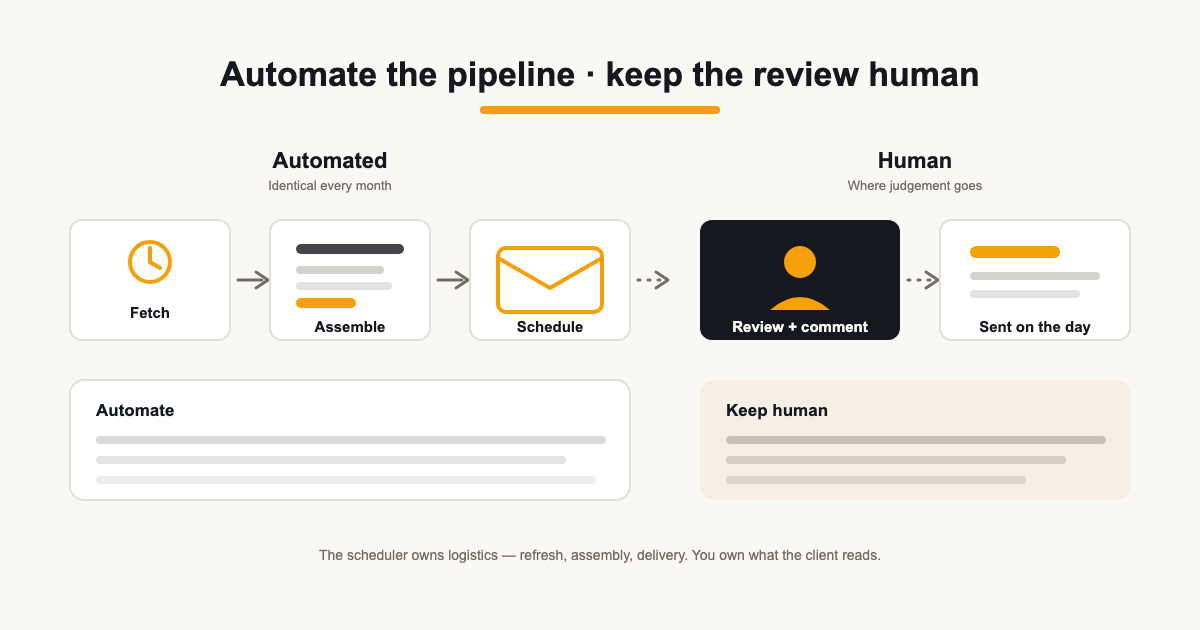
- Automate refresh and delivery; keep commentary, first sends and exception handling manual.
- A scheduled send delivers the saved report — refresh and review it before the delivery date.
- Roll automation out in stages: internal cadence first, client-facing sends once the checks hold.
Contents
Report automation goes wrong at both extremes: agencies that automate nothing spend the first week of every month on assembly, and agencies that automate everything eventually send a broken or meaningless report at scale. The line worth drawing is between the pipeline and the judgement.
This guide covers what to hand to the scheduler — refresh, delivery, reminders — and what stays human: commentary, the first send of anything new, and every exception the pipeline can't see.
Automation moves the report; it doesn't make it
The valuable part of a client report is the interpretation — the bit a client pays a retainer for. Automation's job is to remove everything around that: pulling fresh figures, assembling the layout, delivering the link on the agreed day. If your automation is also writing the conclusions, you have delegated the part that differentiates you.
A useful rule: automate anything a careful person would do identically every month, and keep anything where two careful people might reasonably disagree. Fetching the numbers is the first kind; deciding what they mean is the second.
There is also a trust argument for keeping the split visible. Clients forgive a late report once; they do not forgive discovering that the 'analysis' they've been reading for six months was generated untouched. Automation should make the human input more reliable — it should never simulate it.
What to automate
- Data refresh: pulling fresh figures from connected sources on a cadence, so nobody exports by hand.
- Delivery: sending the saved report link on the agreed day, weekly, monthly or quarterly.
- Reminders: internal prompts that a send is coming, so the review happens before delivery rather than after.
- Repeatable layout: one branded template per client instead of rebuilding the document each period.
Notice none of these touch content. The report a schedule delivers is the one you last saved — the automation owns logistics, you still own what the client reads.
There is a second tier worth automating once the first is stable: the housekeeping around the send. Rotation of share links on a schedule, keeping the saved report's branding in sync when your logo changes, and the distribution list itself — who receives which client's report. Each is small alone and surprisingly expensive when done by hand across forty clients.
What stays human
Commentary is the obvious one — a template can hold the structure, but the hypothesis and the next step are yours. Less obvious are the first send of anything new (a new client, a new template, a new metric) and every exception the pipeline can't see: a lapsed connection, a zero that should have been a number, a month that needs explaining rather than reporting.
Approval gates are the tool for this. A report marked as requiring approval sits out of the automatic sends until someone signs it off — the mechanism that lets you automate the routine accounts without letting the fragile ones ship unreviewed.
Refresh and review before the delivery date
A scheduled send delivers the saved report — it does not fetch fresh data at send time. So the working order is: refresh the data, review the report, then let the schedule carry it. Teams that skip the middle step send technically-automated reports that are functionally stale.
Build the review into the calendar, not the goodwill. If the send lands on the 1st, the review is booked on the 30th — automation handles the delivery, a human holds the last look.
Data freshness matters here too. Sources publish on their own schedules — Search Console settles a day or two behind, ad platforms restate recent figures. A send timed before the data settles delivers a report that will silently differ from the next refresh. Check the freshest complete period is actually inside the numbers, not just that the pipeline ran.
The failure modes worth watching
Automated pipelines fail quietly. A connection lapses and a section goes empty; a cached value goes stale because a refresh errored overnight; a source returns a real zero that looks like a gap. None of these announce themselves in the delivery email — the report just goes out thinner or wrong.
- Lapsed connections: check source status before each send, not when a client asks.
- Stale cache: confirm the refresh actually ran — look at fetched timestamps, not the schedule's promise.
- Empty sections: an honest empty state is a prompt to reconnect, not a section to leave in.
- Zero vs missing: a real zero gets commentary; missing data gets fixed or flagged.
Cadence drift is the quieter failure: the schedule sends on the 1st, but a bank holiday or a client's own calendar means the 3rd was the right day — and nobody noticed because the pipeline kept its promise. Review the calendar occasionally, not just the plumbing.
Roll it out in stages
Start with the internal cadence: dashboards refreshing on schedule, a reminder before each send day, the checklist running the same way every month. Once that loop is dependable, add client-facing delivery on the routine accounts — the ones where the report structure is settled. Keep approval gates on anything new or fragile.
The end state is not 'reports send themselves'. It is 'assembly and delivery are solved, so the review is where the effort goes'. That is a better use of the retainer hours than re-exporting the same figures.
You will know it is working when the monthly question changes — from 'has the report gone out yet?' to 'what are we saying this month?'. The first question is logistics; the second is the job.
The automate-or-human checklist
| Step | Automate? | Why |
|---|---|---|
| Fetch fresh figures | Yes | Identical work every period; errors surface in refresh status |
| Assemble branded layout | Yes | Templates do it identically and better |
| Refresh before send | Yes, with a check | Schedule it — and verify it ran |
| Commentary and hypotheses | No | The judgement clients pay for |
| First send of anything new | No | Unknown failure modes haven't surfaced yet |
| Delivery on the agreed day | Yes | Cadence is the whole point |
| Exception handling | No | A broken or empty section needs a decision, not a send |
ReportingBee is built around this split: connected sources refresh on the widget level, scheduled sends deliver the saved report link on your cadence, and approval settings hold a report out of automatic delivery until you sign off. See the mechanics on automated client reporting, or the broader workflow on automated reporting.
Sources
Related guides
Put it into practice
ReportingBee turns connected marketing data into branded client reports — refresh the figures, write the commentary, send the link.