Integration guide
Search Console data clients can actually read
OAuth once, select the verified property, and turn clicks, impressions, CTR and position into clean report widgets with your SEO commentary attached.
From £9.99/month · Agency £49/month
What you can report on
- Clicks
- How many times searchers clicked through to the site from Google results — the headline organic outcome.
- Impressions & CTR
- How often pages appeared in results and the share that earned a click — together they show whether visibility or appeal is the bottleneck.
- Average position
- The mean ranking across the property's queries for the period — a directional indicator, not a per-keyword daily rank tracker.
Verified properties via Google OAuth
Search Console connects through the same Google sign-in as GA4 and Google Ads. After OAuth, ReportingBee lists the sites your account has verified access to and you pick the right property per client — domain and URL-prefix properties both work as long as your Google account can see them.
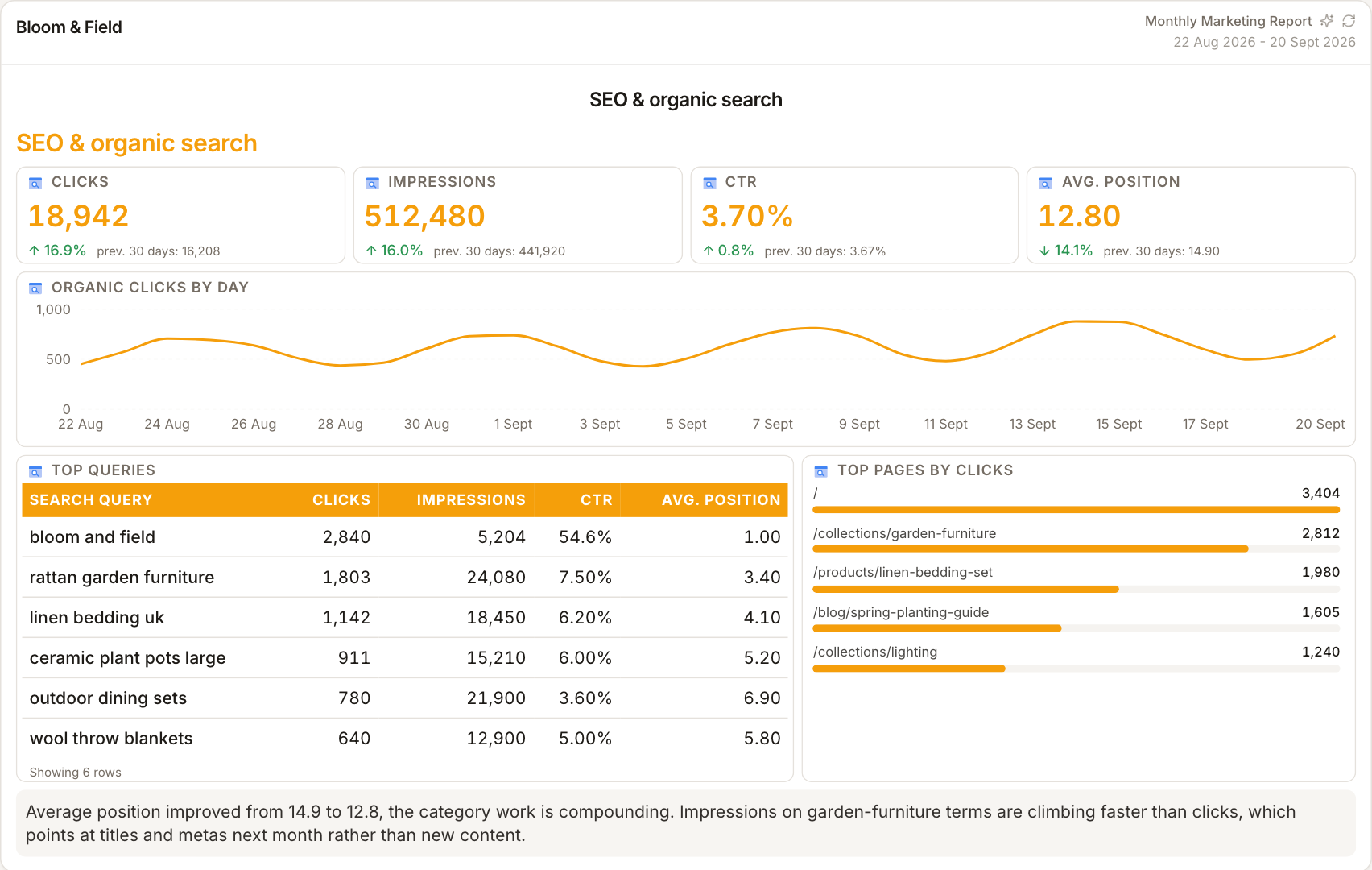
Visibility metrics with plain-English framing
Clicks and impressions answer 'are we being seen and chosen?'; CTR and average position explain why. Presenting them as trend widgets — with queries and pages broken out where useful — turns an intimidating export into a one-minute read for a client who has never opened Search Console.
What it is not
Search Console reports aggregate search performance, not individual keyword positions checked daily. Average position is a blended figure across all queries. If you promise clients specific rank tracking, pair this page's widgets with your dedicated rank tracker.
How it works
01
Connect Google
Use the client's Integrations tab to start Google OAuth and allow Search Console read access.
02
Pick the verified property
Choose the Search Console property that matches the client's site from the available list.
03
Add search widgets
Place clicks, impressions, CTR and position widgets into the SEO section of the client's report or dashboard.
Simple, capped pricing
£9.99/month starter
First client included, then £3.99/month per extra client, capped at ten slots (£45.90/month).
£49/month agency
Flat monthly price with unlimited clients.
Frequently asked questions
Is average position the same as rank tracking?
No. It's Google's blended average across every query the site appeared for. Dedicated rank trackers monitor specific keywords daily; Search Console shows overall search performance.
The property I need isn't listed — why?
ReportingBee can only select properties your connected Google account has verified access to. Add your account as a user in Search Console, then reconnect.
How much does ReportingBee cost?
Starter is £9.99/month for your first client and £3.99/month for each extra client, capped at ten client slots (£45.90/month). The Agency plan is £49/month flat with unlimited clients.
Keep exploring
Google Search Console Reporting
Clicks, impressions, CTR and average position — Search Console's four numbers that matter, composed into the SEO section clients actually read.
SEO Reporting Software
Query visibility from Search Console, organic visits from GA4, authority from Ahrefs — the three signals SEO clients need, in one branded report.
SEO Dashboard
Review organic clicks, top queries and traffic trends in one client view. Refresh connected widgets before a review and choose the period you want to compare.
Browse all reporting guides
Reporting
- Client Reporting Software
- Agency Reporting Software
- Marketing Reporting Software
- Digital Marketing Reporting
- SEO Reporting Software
- SEO Reporting for Agencies
- PPC Reporting Software
- White Label Reporting Software
- Automated Reporting
- Automated Client Reporting
- Ecommerce Reporting
- Analytics Reporting
- KPI Reporting
- Social Media Reporting
- Social Media Reporting Software
- Ahrefs Reporting
- Google Analytics Reporting
- Google Search Console Reporting
- Google Ads Reporting
- Facebook Ads Reporting
- Instagram Reporting
- LinkedIn Reporting
- Mailchimp Reporting
- Facebook Ads Reporting Tool
- Google Ads Reporting Tool
- SEO Client Reporting
- Marketing Agency Reporting
- Digital Agency Reporting
Dashboards
Your first branded report is minutes away
Add a client, connect their data and share a live report today.