In brief
- Check the boring things first — client, property, period — because they fail most often.
- Build rates from summed numerators and denominators, never by averaging rates.
- A scheduled send delivers the saved report; review and refresh it before the delivery date.
Contents
- Confirm ownership and the reporting contract
- Dates and partial periods
- Properties, accounts and filters
- Totals, rates and the zero-versus-missing distinction
- Conversions and attribution configuration
- Manual values, annotations and claims
- Access, branding and the logged-out check
- Schedules, approval and delivery
- The reusable final checklist
A report can contain the wrong property, a partly processed final day or a figure carried over from last month even when the analysis is sound. A repeatable pre-send checklist catches process slips before they reach a client.
This is that checklist, ordered the way errors actually occur: contract, dates, sources, figures, conversions, manual entries, commentary, access, and delivery. Run it before every send until it is muscle memory.
Confirm ownership and the reporting contract
Before checking a single number, confirm who owns the report and what it is meant to show. Ownership means someone is accountable for the send — not just that a schedule exists. The contract is the agreed set of metrics and targets the client judges you on; check the report still covers them rather than drifting toward whatever was easiest to chart.
Scope creep happens quietly here: a widget added for a one-off question three months ago is still there, and a metric the client actually cares about got dropped when a template changed. Compare the report against the contract, not against last month's copy.
Dates and partial periods
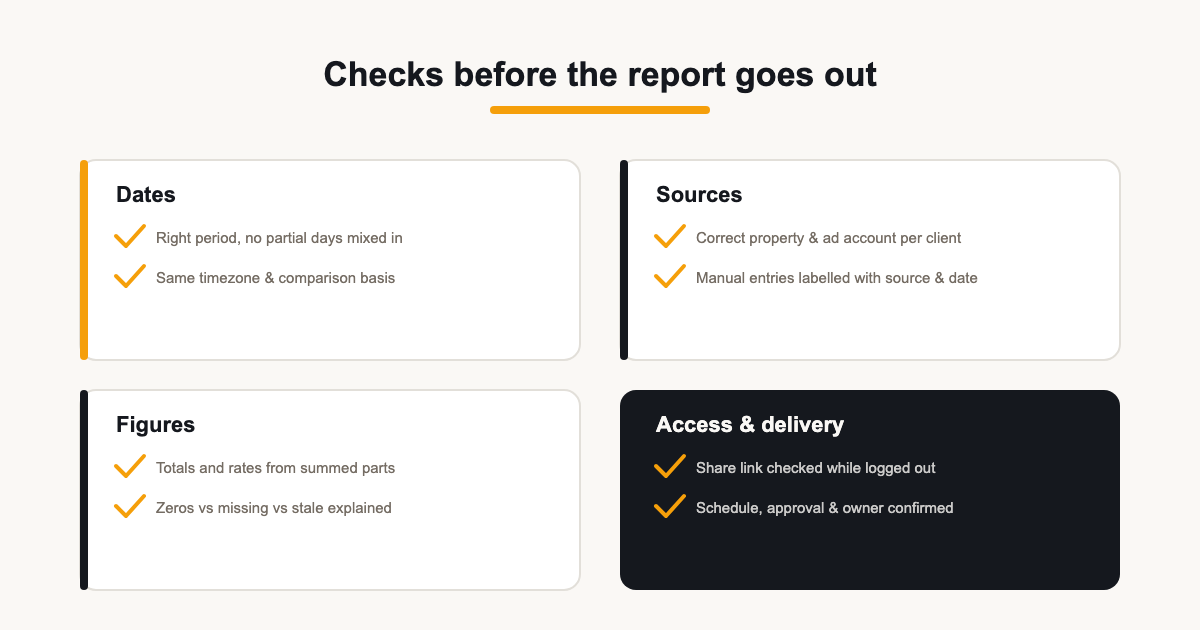
Confirm the reporting period is the one you intend and that every section uses it. Two traps: partial days — the current or final day often holds incomplete data and should be excluded or flagged — and timezone mismatches, where each source's own timezone shifts where the period starts and ends.
Comparison windows deserve the same check: month-on-month and year-on-year only work when the lengths and boundaries match, and comparing a 30-day month to a 31-day month explains part of any “growth”.
Properties, accounts and filters
The wrong-property error is silent and catastrophic: a report full of correct numbers for the wrong account. Verify the GA4 property, the Search Console site, the ad account — the actual advertising customer, not a manager account — and any filters or segments applied.
For clients with similar brands or regional sites, explicitly compare account IDs as well as display names. Save a short source map alongside the reporting brief and revisit it after account migrations or connection changes; familiar-looking numbers are not proof that the source is right.
Totals, rates and the zero-versus-missing distinction
Sanity-check totals against the source, and build rates correctly: a rate for a combined group must come from summed numerators and denominators, not from averaging the individual rates.
Distinguish zero, missing and stale. A real zero is a finding worth commentary; missing data means the source did not return figures; stale means the cache is older than expected because a refresh failed or a connection lapsed. Check refresh errors and connection status, reconnect and refresh where needed — then decide whether the figure belongs in the report at all this month.
Conversions and attribution configuration
Conversion figures deserve a dedicated check because they differ structurally across tools. Confirm the actions tracked are the ones the report claims — GA4 key events reflect the property's configuration; Google Ads conversions reflect the account's conversion actions, column choice and count mode. If conversions look wrong, suspect configuration before performance.
Label each conversion figure with its source so a gap between platforms reads as a definitions question rather than an error. Never add the systems' totals together — each claims overlapping credit.
Manual values, annotations and claims
Any figure entered by hand — organic social metrics, email stats, anything without a live connector — needs two checks: that the number was updated this period, and that the widget still labels its source and reporting dates. A carried-over value can appear current unless you verify its period, so record where and when it was obtained.
Then read your own commentary like a skeptical client. Does every claim have a figure behind it? Is every “cause” actually labelled a hypothesis? Remove adjectives the data cannot support — “surging”, “collapsing” — unless the trend genuinely shows it. The report's credibility lives in the distance between what the numbers show and what the words claim; keep the gap at zero.
Access, branding and the logged-out check
Open the share link in a logged-out or incognito window before sending. You are checking that the link works at all, that it shows the right report, that the branding looks like the client's expectation — logo, colours, footer options — and that nothing internal leaks through. Passwords can still be appropriate for sensitive reports; the point is verifying the experience a recipient actually gets, not removing protection.
Check the small surfaces too: the page title a recipient sees in the browser tab, the sender name on the delivery email, and whether the report still opens correctly on a phone. These are the details that make a report feel finished.
Schedules, approval and delivery
Know exactly what your delivery mechanism does. A scheduled send in ReportingBee emails the saved report link at the chosen cadence — weekly, monthly or quarterly — and does not fetch fresh data at send time. Refresh and review the report before the delivery date, and remember that reports marked as requiring approval are excluded from automatic delivery and must be sent manually.
After the send, confirm delivery and keep the previous version findable. When an error does slip through, have a correction protocol ready: fix the figure, note the correction plainly in the report or a follow-up, and tell the client before they find it. A fast, honest correction preserves more trust than the error cost.
The reusable final checklist
- Right client, right owner, contract metrics still covered.
- Period correct; no partial days; timezone basis consistent.
- Correct property, site and ad account; filters as intended.
- Totals match sources; rates built from summed parts.
- Conversions match each tool's configuration; sources labelled.
- Manual entries updated, with source and dates noted.
- Commentary evidenced; hypotheses labelled; no empty adjectives.
- Share link tested logged out; branding as expected.
- Schedule, approval status and owner confirmed before delivery.
ReportingBee builds much of this into the workflow: connection status is visible before send, manual widgets are labelled, share links can be checked as the client sees them, and approval settings control whether a report goes out automatically. See the cadence and approval mechanics on automated client reporting, and the metric discipline on KPI reporting.
Sources
Related guides
Put it into practice
ReportingBee turns connected marketing data into branded client reports — refresh the figures, write the commentary, send the link.