In brief
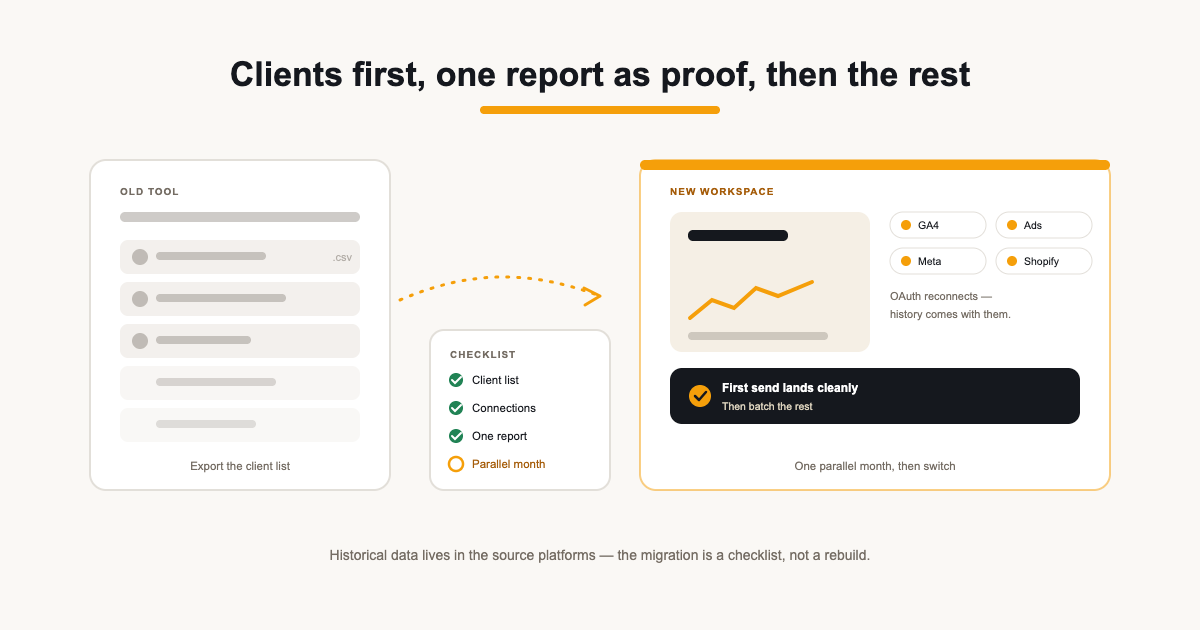
- Export the client list first — it is the skeleton the whole migration hangs on.
- Rebuild one report from a template to prove the shape before migrating all of them.
- One parallel month beats a cold switch — both tools run, the client sees the new one, and nothing is at risk.
Contents
Switching reporting tools feels bigger than it is. The fear is migration — dozens of clients, all their connected sources, all the report history — but the actual work is smaller than the anxiety suggests, because most of what you are moving is a list of clients and a set of connections, not years of bespoke configuration.
The order matters more than the effort: client list first, then connections, then one report as proof, then the rest in batch. Run one month in parallel and the switch is reversible right up until it is not.
What actually migrates (and what does not)
A client record, a set of integration connections, and a report structure — that is most of it. Historical data lives in the source platforms (GA4, Google Ads, Search Console), not in the reporting tool, so reconnecting sources restores history rather than losing it. What does not migrate: the old tool's share links, scheduled sends and widget configurations — those get rebuilt, which is why the order below starts small.
Two things to inventory before the export: which clients still receive reports (archived accounts are dead weight in a CSV), and which of each client's integrations actually power widgets — a connection that drives nothing is ten minutes you do not need to spend reconnecting.
The migration checklist
- Export the client list from the old tool — a CSV of names, websites and contacts is enough.
- Import the list: ReportingBee's CSV import takes AgencyAnalytics-style exports directly, normalises domains and flags duplicates against existing clients.
- Reconnect each client's integrations — Google, Meta, Shopify and the rest use OAuth, so a connection is minutes per client, not an afternoon.
- Pick one client and rebuild their report from a template — the SEO, PPC or all-in-one templates cover the common cases.
- Send that client a report from the new tool alongside the old one for one cycle.
- Batch the rest once the first send lands cleanly.
The order is the protection: the client list lands first because everything hangs off it, connections follow because they are OAuth clicks not data wrangling, and one template report proves the shape before you rebuild thirty. Skipping the proof step is how migrations become weekend-long archaeology.
Run one parallel month
The parallel month is the safety net: one client gets the new report and the old report in the same cycle. If the numbers disagree, you have the comparison to explain why — usually a different period, a different metric definition or a different attribution window, and finding that with one client beats finding it across thirty. When the parallel send lands cleanly, the rest is repetition.
Pick the parallel client deliberately: the one with the most connected sources and the most complex report, not the simplest. If the hardest account migrates cleanly, the rest are mechanical. If it surfaces a gap — a widget type, a metric mapping — you found it while it was still free to fix.
What you keep after switching
The reason to move is what the new tool does that the old one did not — branded share links instead of white-label add-ons, a client portal per account, scheduled sends with an approval step, AI summaries over live numbers. The migration is a weekend, not a quarter; the gains are every month after that.
Audit before you export
Before touching an export, audit what you are actually moving. Which clients are still active? Which integrations are connected but unused? Which scheduled reports get opened, and which have been arriving unread for six months? A migration is the one natural moment to clean house — archiving dead accounts before the export means the new workspace starts tidy instead of inheriting the old tool's dust.
- Drop archived clients from the export — they are noise.
- Note which integrations each client actually uses; reconnect only those.
- List the scheduled sends per client — they are the cadence contract to honour first.
Do you tell the clients?
If the report still arrives on the same day, with the same structure and better branding — most clients will not ask, and a long announcement invites questions about a change they never see. The exception is the share link: if clients bookmark the old portal URL, tell those clients the link is changing. Everything else — the new layout, the portal, the email format — sells itself in the first send.
For the ones who do notice, the honest line works: 'We moved our reporting to a platform we can brand properly — your numbers are the same, the report reads better.' Clients hear 'we invested in the deliverable', which is true. The only real risk is silence — a client who finds a dead link and no explanation assumes the reporting broke, not that it improved.
The cost case, briefly
Run the arithmetic before you switch, not after: per-client pricing versus flat plans matter differently at five clients than at forty. ReportingBee's Agency plan is a flat £49/mo for unlimited clients — at ten clients that comparison usually settles itself, and at thirty it is not close. But a plan that costs less is only a win if the migrated report is at least as good; prove that first with the one-client parallel month, then bank the difference every month after.
Where teams actually get stuck
The stalls are rarely the export. They are the moments where the old tool's configuration has no direct equivalent: a dashboard built from a dozen custom widgets, a metric whose definition only existed in the old tool's defaults, a client whose portal link is wired into their own internal wiki. The honest advice is to find those cases during the audit, not during the migration — one report rebuilt by hand to check the shape beats discovering the mismatch on send day.
The other stall is momentum: the migration that never gets scheduled because report week always arrives first. The parallel month solves that too — it costs one client, one cycle, and it turns 'someday' into a date. Book it before the audit finishes, or the audit becomes the new someday.
Sources
Related guides
Put it into practice
ReportingBee turns connected marketing data into branded client reports — refresh the figures, write the commentary, send the link.