In brief
- White-label means the client sees your agency on every surface — not just a logo on page one.
- The domain, sender name and browser tab are the leaks most agencies miss.
- Test the report as the recipient sees it: logged out, on a phone, and forwarded.
Contents
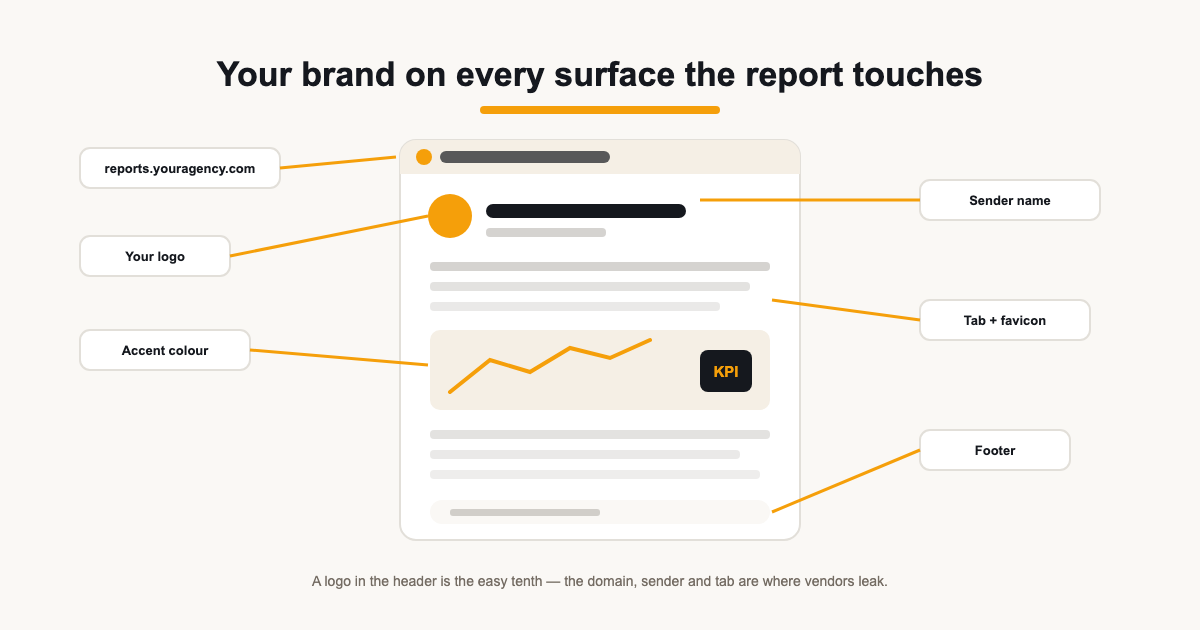
White-labelling a report is easy to claim and easy to half-do. A logo in the header is the visible tenth of it; the other nine-tenths is every surface the document touches on its way to the client — the link domain, the sender name, the browser tab, the email it arrives in, the footer at the bottom.
This guide enumerates those surfaces, the ones that most often leak vendor branding, and a quick test routine that catches a leak before the client does.
What white-label actually means
White-label reporting means the deliverable presents as your agency's own work — your mark, your colours, your domain, your voice — with no third-party brand between you and the client. The point isn't secrecy about your tooling; it's that a forwarded link or printed page carries your identity, not your vendor's.
Clients do notice. A report link on someone else's domain reads as a tool export; the same report on reports.youragency.com reads as a deliverable. The difference is perceived ownership of the work — which is what retainers are priced on.
The bar is higher than 'no vendor logo'. A report is white-label when it could plausibly be your own internal system — coherent typography, your accent carried through charts and tables, a domain that resolves under your brand, an email that reads like it came from a person at your agency. Anything that reminds the reader 'this was assembled by a tool' breaks the illusion the branding is building.
Every surface the report touches
Count the surfaces, because each one either carries your brand or leaks someone else's. The report header and its accent colour are the obvious two. Then the less visible ones: the share-link domain, the page title and favicon in the browser tab, the sender name and from-address on the delivery email, the portal page if clients get one, the footer — and whether 'powered by' text is optional or forced.
- Report chrome: logo, accent colour, fonts, cover layout, footer.
- Link domain: a share URL on your own domain, not the vendor's.
- Browser tab: the report's own title and a favicon — yours or the client's.
- Email: sender name, from-address, subject line.
- Portal: the same branding applied to the always-on client view.
Audit them in the order the recipient meets them: the email first, then the link, then the tab, then the page itself, then anything they scroll to last. A leak found at step two is a leak a client found first.
The domain is the loudest surface
Of all the surfaces, the link domain carries the most weight because it's the first thing a recipient reads — before the report even loads. A share URL on the reporting tool's domain advertises the vendor; reports.youragency.com advertises you. Custom domains also survive forwarding intact: the URL travels with the report wherever it's sent.
Setting one up is a one-time DNS change plus an SSL provision on the reporting platform's side — CNAME the subdomain, wait for the certificate, then every shared report link and portal page is served from it. After that the domain is invisible effort: set once, branded forever.
Pick a subdomain you'll keep. Report links get bookmarked, forwarded and quoted back months later — reports.agency.com that later becomes clients.agency.com orphans every link already sent. And when you rotate a share token, the new link lands on the same domain, so the fix is invisible to everyone except whoever held the old URL.
Consistency across report, portal and email
Branding that differs across surfaces looks accidental — a report on your domain but a portal on the vendor's, your logo in the header but a generic sender name on the email. The client reads the set as a whole, so audit the set as a whole: the same identity whether they open the monthly link, log into their portal, or reply to the delivery email.
Client-facing surfaces should also carry client-appropriate branding where you offer it — a client's own logo or favicon on their portal makes the page feel built for them, which is the difference between a vendor screen and a service.
The internal side gets a pass nobody tells you about: your team can live inside the vendor's UI all day. White-labelling is about the boundary — everything that crosses to the client carries your mark, everything that stays inside can stay functional. Spend the effort on the crossing points.
What white-label should hide — and show
Branding cuts both ways: everything internal should stay internal. Other clients' names, your diagnostic widgets, connection warnings, internal annotations — a shared report should carry only the curated layer. The white-label test isn't just 'is my logo there' but 'is anything here that isn't meant for this reader'.
The same discipline applies to the small print: the tab title should be the report's name, the sender should be recognisable, and nothing in the URL or page should expose another client's slug or an internal ID.
Where vendor branding usually leaks
| Surface | What clients see | The usual leak |
|---|---|---|
| Share link | The URL in their inbox | Vendor domain or a raw token URL |
| Browser tab | Title and favicon | The tool's name or default icon |
| Sender name, subject, footer | Sent 'via' the vendor's brand | |
| Report footer | Attribution line | A 'powered by' that can't be removed |
| Portal | The always-on view | Different branding than the report |
| PDF export | The printed deliverable | Vendor logo baked into the layout |
Test it as the recipient
Three checks, five minutes, every new client: open the share link logged out — does it work and whose branding shows? Open it on a phone — does the layout hold? Forward the email to yourself — does the sender name, link and page still present as yours end to end?
Re-run the check after every branding change — a new logo upload, a domain move, a template swap. White-label failures rarely appear on day one; they appear the day you change one surface and forget the other five exist.
In ReportingBee the branding layer is workspace-wide: your logo, accent and custom domain apply to shared reports, portals and delivery emails at once — and per-client options like the browser-tab favicon let a portal wear the client's own mark. See the coverage on white label reporting software, or the always-on surface on client reporting dashboard.
Sources
Related guides
Put it into practice
ReportingBee turns connected marketing data into branded client reports — refresh the figures, write the commentary, send the link.