Marketing reporting
Digital marketing reporting built for the review meeting
From search visibility to ad spend to on-site behaviour — one report that walks a client through contribution, not just a stack of channel exports.
From £9.99/month · Agency £49/month
What you can report on
- Search visibility
- Search Console clicks and impressions — the top of the funnel, showing whether the brand is being found before any click is bought.
- Paid efficiency
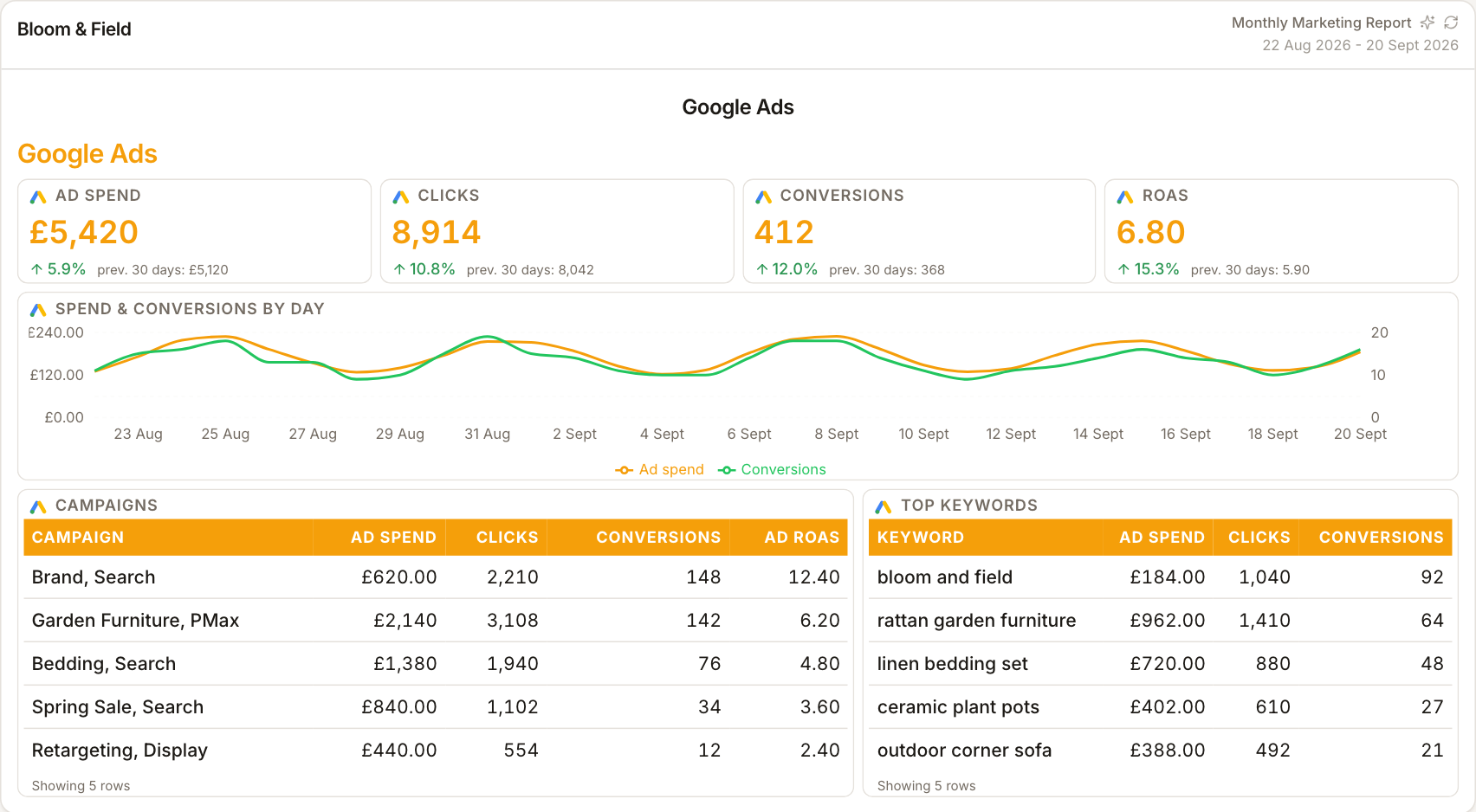
- Ad platform spend against results — the bought side of acquisition, reported with each platform's figures labelled.
- Site engagement
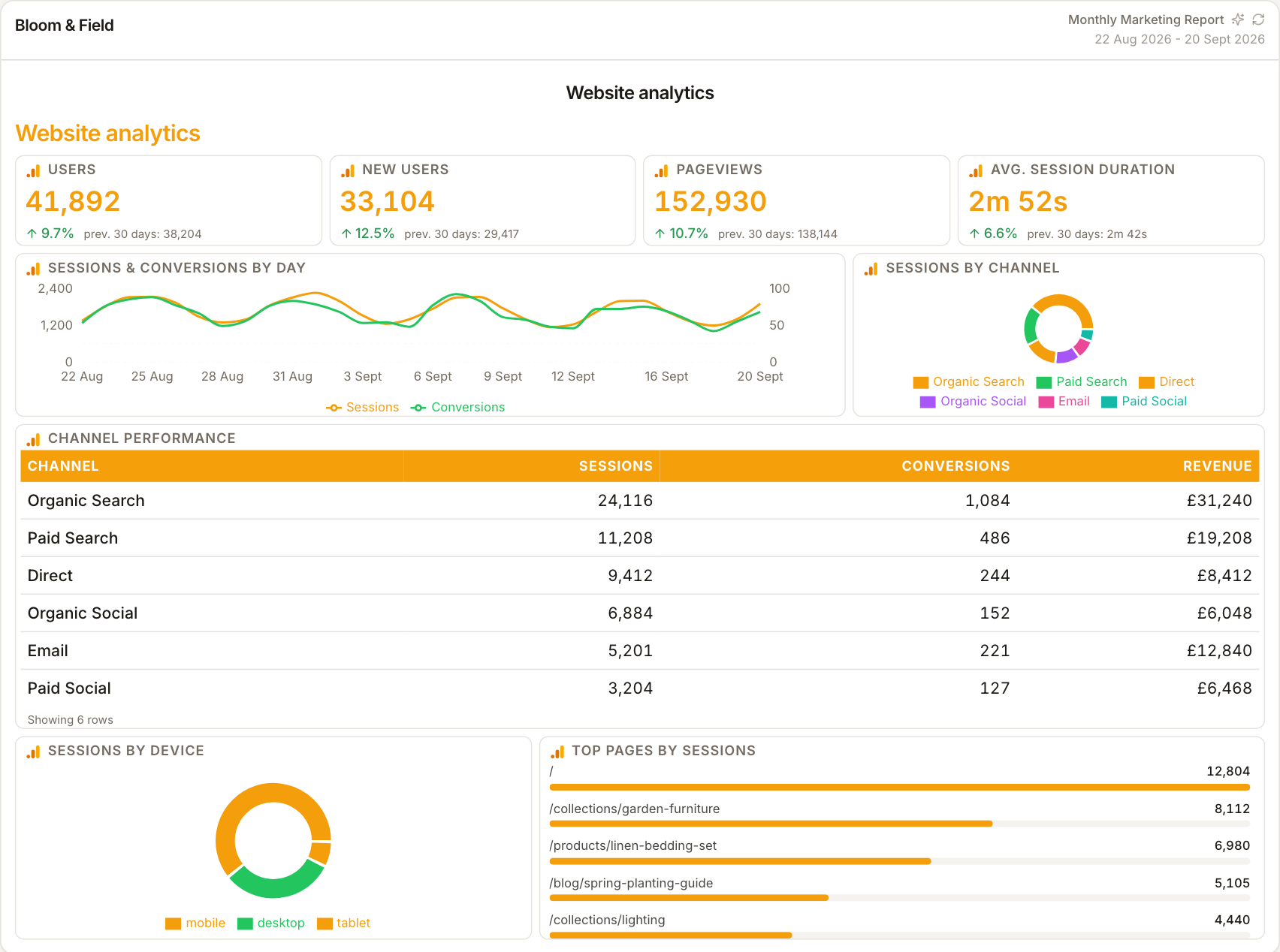
- GA4 sessions, engagement and conversions — what all that traffic actually did once it arrived.
Structure that mirrors the funnel
Executive reviews go badly when the report is a pile of disconnected channel metrics. ReportingBee pages let you order the story — visibility, acquisition, behaviour, outcomes — so the client follows a narrative from 'were we seen?' to 'did it convert?' rather than flipping between tool screenshots.
Contribution, not credit
The right framing for digital marketing reporting is contribution: search built awareness, paid captured demand, the site converted it. Each platform's own attribution will claim more; your report presents the sources side by side and your commentary assigns the meaning.
Reusable for every monthly review
The review deck or doc you rebuild each month becomes a saved report: same sections, fresh figures on refresh, your updated commentary. Clients learn the format and start reading ahead of the call — which changes the meeting from reporting to deciding.
How it works
01
Map the client's funnel
List which channels feed awareness, acquisition and conversion for this client.
02
Build sections in that order
Visibility first, then acquisition, then on-site outcomes — each with source-labelled figures.
03
Rehearse the story
Use commentary blocks for the 'so what' — the report should defend itself before the meeting starts.
Simple, capped pricing
£9.99/month starter
First client included, then £3.99/month per extra client, capped at ten slots (£45.90/month).
£49/month agency
Flat monthly price with unlimited clients.
Frequently asked questions
Is this for client-facing or internal use?
Both, but it's designed client-facing first: branding, narrative and share links make it the document you send before the review call.
Does it replace our analytics tools?
No — it reports on them. GA4, ad platforms and Search Console remain the measurement tools; ReportingBee is the presentation and delivery layer.
How much does ReportingBee cost?
Starter is £9.99/month for your first client and £3.99/month for each extra client, capped at ten client slots (£45.90/month). The Agency plan is £49/month flat with unlimited clients.
Keep exploring
Marketing Reporting Software
Search, ads, social and email in one report — each channel's figures labelled by source, with commentary that explains the mix instead of summing it.
Marketing Reporting Dashboard
Sessions, spend, conversions and rates across every channel on one screen — a working overview for channel owners, not a vanity wall.
Client Reporting Software
Build the deliverable once — your branding, your commentary, their numbers — then let it become the reusable monthly report clients expect by name.
Browse all reporting guides
Reporting
- Client Reporting Software
- Agency Reporting Software
- Marketing Reporting Software
- Digital Marketing Reporting
- SEO Reporting Software
- SEO Reporting for Agencies
- PPC Reporting Software
- White Label Reporting Software
- Automated Reporting
- Automated Client Reporting
- Ecommerce Reporting
- Analytics Reporting
- KPI Reporting
- Social Media Reporting
- Social Media Reporting Software
- Ahrefs Reporting
- Google Analytics Reporting
- Google Search Console Reporting
- Google Ads Reporting
- Facebook Ads Reporting
- Instagram Reporting
- LinkedIn Reporting
- Mailchimp Reporting
- Facebook Ads Reporting Tool
- Google Ads Reporting Tool
- SEO Client Reporting
- Marketing Agency Reporting
- Digital Agency Reporting
Dashboards
Your first branded report is minutes away
Add a client, connect their data and share a live report today.