Dashboards
An SEO dashboard you check, not babysit
Review organic clicks, top queries and traffic trends in one client view. Refresh connected widgets before a review and choose the period you want to compare.
From £9.99/month · Agency £49/month
What you can report on
- Organic clicks
- Search Console clicks over the selected period — the pulse metric of an SEO dashboard.
- Query movement
- The queries gaining or losing impressions — early signal of content paying off or decaying.
- Organic sessions
- GA4's view of search traffic reaching the site — confirms visibility converts to visits.
Monitoring between monthly reports
The monthly report tells the story; the dashboard is where you notice the story changing mid-month. A dip in clicks or a query losing impressions is a prompt to investigate — caught on the dashboard, explained in the next report.
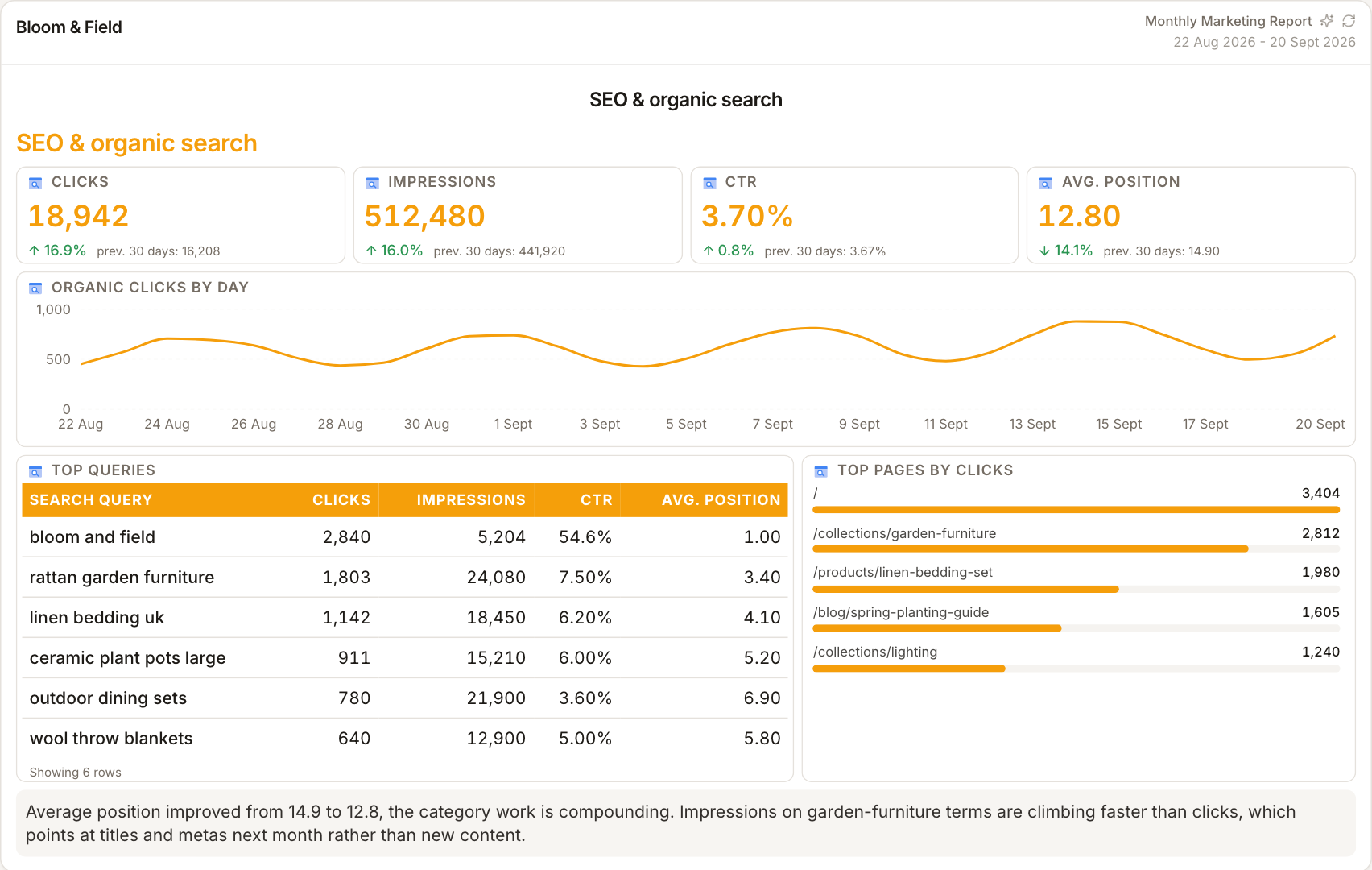
Refresh before the review
Use Refresh to request current data from connected sources, or select a new reporting period. Provider processing delays still apply, especially for Search Console. Check the selected dates and refresh the dashboard before drawing conclusions.
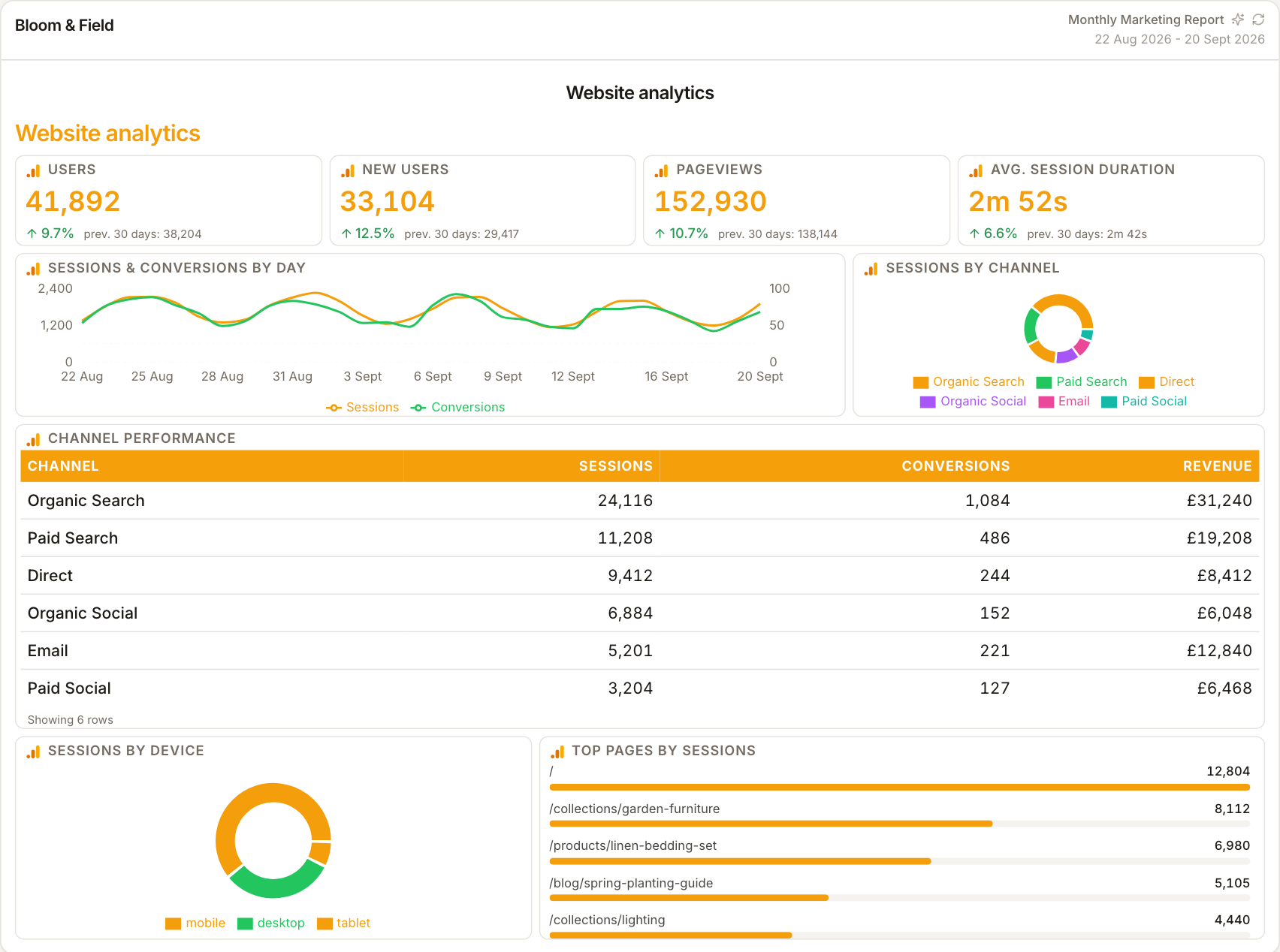
Per client, per account
Each client's dashboard reflects their connected sources. Review it weekly across the book: stable clients get a glance, movers get attention — the dashboard triages where your SEO time goes this week.
How it works
01
Connect Search Console and GA4
Link the client's properties so the dashboard has its organic data sources.
02
Arrange the widgets
Clicks trend, query table, sessions and authority — monitoring order, not report order.
03
Refresh and review
Refresh connected widgets, check the selected dates, and investigate changes in the source platform when needed.
Simple, capped pricing
£9.99/month starter
First client included, then £3.99/month per extra client, capped at ten slots (£45.90/month).
£49/month agency
Flat monthly price with unlimited clients.
Frequently asked questions
Is the dashboard live?
The dashboard uses fetched data rather than a continuous real-time feed. Use Refresh or change the reporting period to request updated figures; provider processing delays still apply.
Can clients see the dashboard?
Client-facing sharing is through reports, share links and the portal; dashboards are primarily your working monitor between report sends.
How much does ReportingBee cost?
Starter is £9.99/month for your first client and £3.99/month for each extra client, capped at ten client slots (£45.90/month). The Agency plan is £49/month flat with unlimited clients.
Keep exploring
SEO Reporting Dashboard
The SEO dashboard arranged in review order — visibility first, outcomes second, authority last — ready to screen-share without rearranging.
SEO Reporting Software
Query visibility from Search Console, organic visits from GA4, authority from Ahrefs — the three signals SEO clients need, in one branded report.
Marketing Reporting Dashboard
Sessions, spend, conversions and rates across every channel on one screen — a working overview for channel owners, not a vanity wall.
Browse all reporting guides
Reporting
- Client Reporting Software
- Agency Reporting Software
- Marketing Reporting Software
- Digital Marketing Reporting
- SEO Reporting Software
- SEO Reporting for Agencies
- PPC Reporting Software
- White Label Reporting Software
- Automated Reporting
- Automated Client Reporting
- Ecommerce Reporting
- Analytics Reporting
- KPI Reporting
- Social Media Reporting
- Social Media Reporting Software
- Ahrefs Reporting
- Google Analytics Reporting
- Google Search Console Reporting
- Google Ads Reporting
- Facebook Ads Reporting
- Instagram Reporting
- LinkedIn Reporting
- Mailchimp Reporting
- Facebook Ads Reporting Tool
- Google Ads Reporting Tool
- SEO Client Reporting
- Marketing Agency Reporting
- Digital Agency Reporting
Dashboards
Your first branded report is minutes away
Add a client, connect their data and share a live report today.